 Simulation
Fit check
Is Desktop Dog worth it for you?
We tell you who should skip it, too.
Play it if you…
Good fit- Desktop pet fans who want dogs present during other computer activities
- Steam users interested in interactive animated companions rather than a conventional game
- Players who want customizable dog styles shared through Steam Workshop
Skip it if you…
Saves you a refund- Players seeking a structured campaign, progression system, or goal-driven simulation
- Users who want a conventional game with extended sessions rather than ambient desktop interactions
- People using operating systems outside the Windows versions listed
Our take on Desktop Dog
The defining detail is that the dogs remain active on top of desktop activity, reacting to mouse input while other games, software, or live wallpapers are running.
What is Desktop Dog?
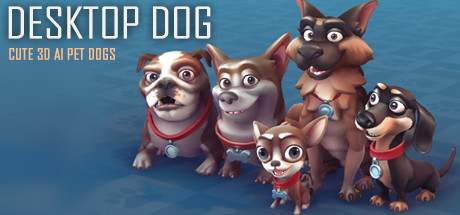
Desktop Dog places AI cartoon dogs on the desktop while other games or software are in use.
The dogs can be played with, fed, clicked, dragged, resized, and observed as they react to mouse movement. They sleep, snore, leave footprints, kick up dust, bark, and display other animations. A circular menu opens with the right mouse button. The application includes an alarm list, chat with Steam friends, optional display above other windows, and Steam Workshop support for sharing and downloading dog styles. It can run alongside other software and live wallpapers, with taskbar transparency and blur options. The listing names support for Windows 7 with Aero, 8, 8. 1, 10, and 11, plus multiple languages.
How Desktop Dog plays
- 01Mouse Interactions
- Dogs respond to clicks, dragging, scrolling, and mouse movement with changes in behavior and size.
- 02Dog Animations
- Dogs can sleep, snore, bark, walk with footprints, and stir up dust on the screen.
- 03Steam Workshop
- Steam Workshop allows dog styles to be shared and downloaded.
- 04Desktop Overlay
- An optional setting keeps the dogs displayed above other windows.
- 05Steam Friend Chat
- The application includes chat with Steam friends.
- 06Alarm List
- An alarm list is included alongside the desktop pet features.
Games like Desktop Dog
Simulation Simulation
DesktopMMD4:Born to Dance
XDesktopSoftFor:MMD fans who want to play existing VMD dance filesSkip if:Users seeking a dance creation or editing suite rather than a playback application Simulation
EasyMMD
Megu StudioFor:MMD fans who want to view animations in VR rather than only on a monitorSkip if:Users seeking a deep character-animation authoring suite with advanced production controls Simulation
Desktop Magic Engine
XDesktopSoftFor:Desktop customization fans who want animated 3D characters alongside everyday windowsSkip if:Users seeking a conventional game with levels, objectives, or character progressionPicked by overlapping fit notes and genres, not an editorial comparison.
Desktop Dog: platforms & release
Is Desktop Dog worth it?
It is worth it if: desktop pet fans who want dogs present during other computer activities. Skip it if: players seeking a structured campaign, progression system, or goal-driven simulation.
Where can I download Desktop Dog?
Use the Download Now button on this page: it opens Desktop Dog's store page, where you can choose how to get it.
What platforms is Desktop Dog on?
Windows only.