 Simulation
Fit check
Is Astro VR worth it for you?
We tell you who should skip it, too.
Play it if you…
Good fit- Astronomy enthusiasts who want to explore solar system objects and exoplanets interactively.
- Learners who want to compare celestial objects and inspect available measurements.
- VR users who want to move through astronomical objects and observe orbital motion over time.
Skip it if you…
Saves you a refund- Players looking for objectives, progression, or a story may find the experience is focused on free exploration and observation.
- Users seeking a polished AR view may hit a wall when setting a webcam background, which the vendor says can appear fuzzy and laggy.
- People looking for a conventional management or survival simulation will not find those systems here.
Our take on Astro VR
The likely sticking point is the experience’s open-ended structure: after choosing a destination or time scale, there is no stated mission or progression to guide the next step. Those seeking structured goals may run out of direction once exploration and object inspection are underway.
What is Astro VR?
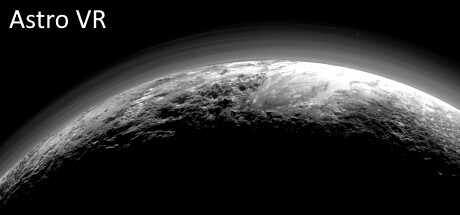
Travel through the solar system to view its planets, moons, asteroids, and other small bodies, or visit thousands of stars and exoplanets beyond it.
The simulation displays object labels and information such as size, mass, temperature, and orbital data when available, with side-by-side comparisons to the Sun, Jupiter, Earth, and the Moon. Set time to watch objects move in their orbits, and run it forward or backward. Separate size and distance scales let the solar system fit within arm’s reach or match real-world scale.
Movement and zoom use two controls in VR; the simulation also supports keyboard and mouse on a flat screen. A webcam can be used as an AR background, though the vendor warns that this may look fuzzy and lag.
How Astro VR plays
- 01Time controls
- Advance or reverse time to observe orbital motion, with positions extrapolated beyond the available dataset.
- 02Object information
- View available measurements including position, orbit, size, mass, temperature, and luminosity.
- 03Scale adjustment
- Set object-size and distance scales independently, from a compact solar system view to matching scales.
- 04Flat-screen controls
- Keyboard and mouse can be used instead of VR controllers.
Games like Astro VR
Simulation Simulation
Solar System Simulator
WPCFor:Space enthusiasts who want to explore planets and moons rather than manage a spacefaring storySkip if:Players seeking a structured campaign with missions, progression, or a defined ending Simulation
Planetarium 2 - Zen Odyssey
Ghulam JewelFor:Space enthusiasts who want an open-ended astronomy sandboxSkip if:Players looking for a structured campaign, missions, or a defined victory condition Simulation
Virtual telescope
Anton ShatalovFor:People interested in viewing the night sky who want a location- and time-based displaySkip if:People seeking hands-on control of a detailed astrophysical simulationPicked by overlapping fit notes and genres, not an editorial comparison.
Astro VR: platforms & release
Is Astro VR worth it?
It is worth it if: astronomy enthusiasts who want to explore solar system objects and exoplanets interactively. Skip it if: players looking for objectives, progression, or a story may find the experience is focused on free exploration and observation.
Where can I download Astro VR?
Use the Download Now button on this page: it opens Astro VR's store page, where you can choose how to get it.
What platforms is Astro VR on?
Windows only.