 Simulation
Fit check
Is Nightmare Puppeteer worth it for you?
We tell you who should skip it, too.
Play it if you…
Good fit- Animation makers who want deliberately strange short-form scenes
- Filmmakers who want keyboard-controlled puppetry rather than conventional editing
- Streamers who want chat-driven scenes and automated visual events
Skip it if you…
Saves you a refund- Creators seeking normal, mainstream or realistic animation styles
- Users wanting a conventional linear animation workflow instead of experimental tools and procedural modes
- People who do not want to assemble characters, media and scenes manually
- Creators looking for a general-purpose video editor rather than an animation and puppetry engine
Our take on Nightmare Puppeteer
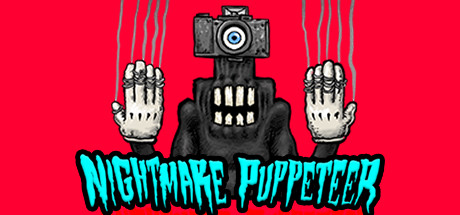
Its defining format is a puppetry engine where keyboard input can direct actors, cameras, lights and time, while automated modes can generate strange scenes without continuous manual control.
What is Nightmare Puppeteer?
Create surreal animations by assembling characters from heads, bodies, props, eyes, teeth, noses and hair, then control actors, cameras, lighting and timing with a keyboard.
The software includes 60 scenes, 90 heads, 108 bodies and 90 props, plus support for custom models and Steam Workshop sharing. Actors can use recorded voices or a live microphone with automatic lip synchronization, including user-drawn faces. Add images, text, video, green-screen footage, sounds, MIDI files or subtitle files. Music-driven animation, 360-degree image capture, Twitch chat control, remix recording and automated TV Mode provide different production methods. Manual puppetry and AI-controlled modes can generate short animations, GIFs, music videos and other original scenes.
How Nightmare Puppeteer plays
- 01Character assembly
- Mix 90 heads, 108 bodies, 90 props and additional facial parts, with support for custom character content.
- 02Keyboard puppetry
- Use keyboard input to direct actors while managing cameras, lights and the flow of time.
- 03Automatic lip sync
- Recorded voices or microphone input can animate mouth movement, including on user-drawn faces.
- 04Procedural TV mode
- Algorithms generate animated scenes automatically, including sequences that can run without manual puppeteering.
- 05Media compositing
- Place personal images, text and videos, including green-screen footage, into scenes.
- 06Music-driven animation
- Beat detection or MIDI input can control cuts, actor motion and changes between heads and bodies.
- 07Twitch interaction
- Chat participants can control scene elements and add images, text and video during Twitch Mode.
- 08Workshop sharing
- Share custom scenes, actors, voice files and other creations through Steam Workshop.
Games like Nightmare Puppeteer
Simulation Simulation
AI Battle Royale Generator
Kilz KnightFor:Twitch streamers who want viewers to participate in AI-controlled matchesSkip if:Players seeking direct, character-focused battle royale combat rather than AI-run simulations Simulation
IRMÃO Grande & Brasileiro 2
Jogo JoiaFor:Reality-show fans who want to create and manage a custom castSkip if:Players seeking direct-action gameplay rather than observing or directing simulated contestants Simulation
StepX
Bitlock StudioFor:Casual music makers who want mouse-based compositionSkip if:Users seeking a full music-production workstation with a broad recording and editing workflowPicked by overlapping fit notes and genres, not an editorial comparison.
Nightmare Puppeteer: platforms & release
Is Nightmare Puppeteer worth it?
It is worth it if: animation makers who want deliberately strange short-form scenes. Skip it if: creators seeking normal, mainstream or realistic animation styles.
Where can I download Nightmare Puppeteer?
Use the Download Now button on this page: it opens Nightmare Puppeteer's store page, where you can choose how to get it.
What platforms is Nightmare Puppeteer on?
Windows only.