Fit check
Is JAMM worth it for you?
We tell you who should skip it, too.
Play it if you…
Good fit- People making maps to share with a party who do not need a general-purpose game development tool
- Map makers who want both perspective or orthographic layouts and immersive 3D views
- Users who need image exports or OBJ/MTL files for further use in other applications
Skip it if you…
Saves you a refund- Users who need every model to export as OBJ may hit a limit with some trees, ships, and cars.
- Map makers who need layouts without choosing among 12 grid options may find the available grid system restrictive.
- Users seeking a general-purpose game development tool rather than a map maker may need a different tool.
Our take on JAMM
The export boundary is the clearest point where some users may hit a wall: most models can be saved as OBJ, but certain trees, ships, and cars cannot. Anyone building a workflow around those objects will need to account for that exception.
What is JAMM?
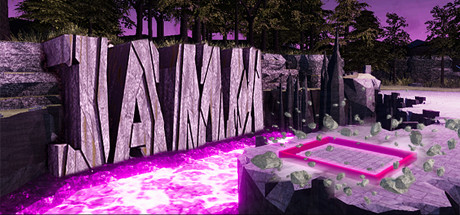
JAMM creates perspective, orthographic, and immersive 3D maps.
Two-dimensional scenes can become high-resolution JPG or PNG files, while three-dimensional scenes support OBJ/MTL output for other programs. The export rate for models is 99%, excluding certain trees, ships, and cars. Placement can respond to the ground beneath the cursor by choosing a matching element variant, or a specific type can be selected directly. Visual controls cover time settings, eight weather choices, and sixteen color themes. Twelve grid patterns include squares, hexagons, and textures. Custom JPG and PNG artwork can be added through a supplied folder. The interface can be concealed for television display or screen recording.
How JAMM plays
- 01Image and 3D exports
- Maps can be saved as high-resolution JPG or PNG images, while 3D exports use OBJ/MTL files; some trees, ships, and cars are excluded from OBJ export.
- 02Terrain-based placement
- A tool can choose an element version according to the terrain below the cursor, while a secondary tool allows manual element selection.
- 03Weather and themes
- Map styling includes 8 weather options, different times of day, and 16 color themes.
- 04Grid choices
- The 12 options range from no grid to square, hex, and textured patterns.
- 05Custom image assets
- JPG and PNG files can be copied into a provided folder for use within the map-making environment.
JAMM compared to similar games
JAMM creates perspective and orthographic maps, immersive views, and 3D exports, while Illwinter's Floorplan Generator focuses on grid-based dungeon and wilderness floorplans for drawing and printing tabletop encounters. JAMM also offers weather and theme controls and exports JPG/PNG and OBJ/MTL files; Illwinter's description centers on making printable floorplans.
JAMM: platforms & release
Is JAMM worth it?
It is worth it if: people making maps to share with a party who do not need a general-purpose game development tool. Skip it if: users who need every model to export as OBJ may hit a limit with some trees, ships, and cars.
Where can I download JAMM?
Use the Download Now button on this page: it opens JAMM's store page, where you can choose how to get it.
What platforms is JAMM on?
Windows only.